Arrays are a fundamental data structure that stores data in memory. In Ruby you can store anything in an array, from strings to integers and even other arrays. The elements in an array are accessed using their index, which starts at 0.
This is what an array containing the words “cat”, “dog” and “tiger” would look like:
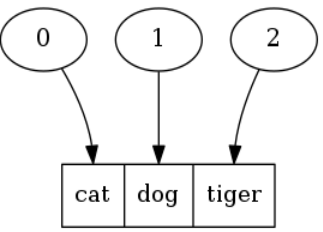
Ruby Arrays – Basic Operations
To work with an array you will have to create one first, there are multiple ways to do it.
Initialize an empty array:
|
1 2 3 |
# Both of these do the same thing, but the second form is prefered users = Array.new users = [] |
Initialize an array with data:
|
1 |
users = ["john", "david", "peter"] |
Alternatively, you can avoid having to type the quotes for every string by doing this:
|
1 2 |
# Same effect as last time, but much faster to type users = %w(john david peter) |
Now that we have an array the next step would be accessing the elements that it contains.
Access array element by index:
|
1 2 3 |
users[0] # First element of the array users[1] # Second element of the array users[2] # Third element of the array |
You can also use the first and last methods:
|
1 2 |
users.first # First element of the array users.last # Last element of the array |
At this point you may want to add items to your array:
|
1 2 3 |
# Both of these have the same effect, << is prefered. users.push "andrew" users << "andrew" |
And finally, here is how you delete elements from your array:
|
1 2 |
last_user = users.pop # Removes the last element from the array and returns it user.delete_at(0) # Removes the first element of the array |
There is also the shift / unshift methods, which are similar to pop/push but take or add elements in front of the array.
|
1 2 |
users.unshift "robert" # Adds an element in front of the array users.shift # Removes the first element of the array and returns it |
Here is a small cheatsheet for you:
|
1 2 3 4 |
init -> Array.new, [], %w read -> [0], first, last add -> push, <<, unshift remove -> pop, delete_at, shift |
Iterating Over Ruby Arrays
Now that you have got an array wouldn’t it be nice if you could enumerate its contents and print them? Well the good news is that you can!
Example: Print your array using each
|
1 |
users.each { |item| puts item } |
Most of these looping operations are available thanks to the Enumerable module, which is mixed into the Array class by default.
Example: Capitalize every word in our Array using map.
|
1 2 |
users = users.map { |user| user.capitalize } user = users.map(&:capitalize) # This syntax is available since Ruby 1.9 |
The map method doesn’t modify the array in-place it just returns a new array with the modified elements, so we neeed to asign the results back to a variable. There is also a map! (notice the exclamation point) method which will modify the array directly, but in general the simpler version is prefered.
Another thing you may want to do is find all the items in your array that fit certain criteria.
Example: Find all the numbers greater than 10:
|
1 2 3 |
numbers = [3, 7, 12, 2, 49] numbers.select { |n| n > 10 } # => 12, 49 |
More Array Operations
There are a lot of things you can do using arrays, like sorting them or picking random elements.
You can use the sort method to sort an array, this will work fine if all you have is strings or numbers in your array. For more advanced sorting check out sort_by.
|
1 |
numbers = numbers.sort |
You can also remove the duplicate elements from an array, if you find yourself doing this often you may want to consider using a Set instead.
|
1 2 3 |
numbers = [1, 3, 3, 5, 5] numbers = numbers.uniq # => [1, 3, 5] |
If you want to pick one random element from your array you can use the sample method:
|
1 |
numbers.sample |
You may also want to “slice” your array, taking a portion of it instead of the whole thing.
Example: Take the first 3 elements from the array, without changing it:
|
1 2 |
numbers.take 3 numbers[0,3] |
Operations involving multiple arrays
If you have two arrays and want to join them you can do it like this.
|
1 2 3 |
# These do the same thing users.concat(new_users) # Faster since it works in-place users += new_users |
You can also remove elements from one array like this, where users_to_delete is also an array:
|
1 |
users = users - users_to_delete |
Finally, you can get the elements that appear in two arrays at the same time:
|
1 |
users & new_users |
Conclusion
Arrays are very useful and they will be a powerful ally by your side. Don’t forget to check out the documentation if you are unsure of what a method does.

10 comments
Skip to comment form
You’ve covered adding elements to the end of an array, and removing them from there, but ignored the front end, which is necessary in order to make a queue. There, you can use shift and unshift, respectively.
Thank you, I will add these
Wait to you get into any? none? each_cons and each_slice
Isn’t ruby an awesome language? Great write up, keep them coming!
Yeah, I love Ruby! Thanks for your comment
You can also use Array#shift instead of Array#delete_at(0), and use Array#slice instead of Array#[start, length]
Another fun one is reaching around arrays in the opposite direction with negative indexes. Example:
%w(1 2 3 4 5 6)[-2]
=> returns “5”
Ruby arrays really do give you a lot out-of-the-box when you compare it to other languages. Nice post!
Thanks for your comment
#each_with_index,#each_with_objectand#zip, all from Enumerable, are often helpful with arrays. Most people seem unaware of#zip, in particular.good post, didn’t know about ‘numbers.take 3′ method, thanks
Nice Article